

# content
01 css 파일 작성
02 javascript 파일 작성
03 html 파일에 css, javascript 파일 가져오기
웹 페이지를 구현하는 데 있어 사용되는 html 언어와 이를 꾸미는 css, 그리고 동작을 나타내는 javascript들이 어떻게 서로 연동이 되는지 알아볼 것이다.
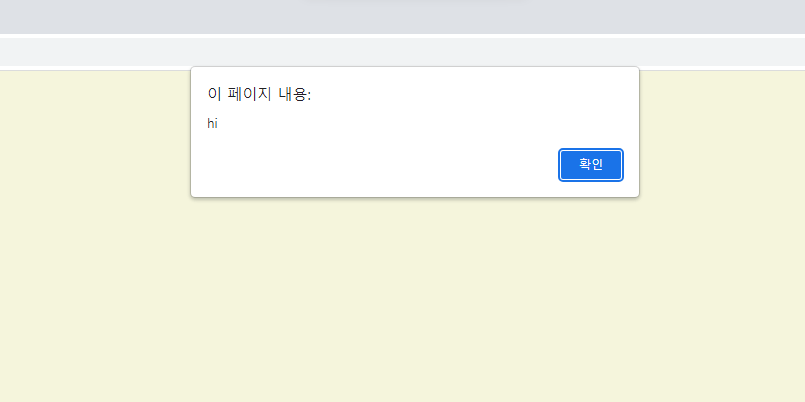
간단하게 웹 페이지가 열리면서 배경색상과 안내창을 띄우는 코드를 확인해보면
먼저, javascript를 통해 페이지가 열릴때 hi라는 안내 창을 띄우도록 구현해볼 것인데 alert 명령어를 사용하여 hi라는 문구를 띄울 수 있도록 해본다.
//app.js
alert("hi");
그다음 css를 이용하여 css파일에 웹 페이지의 배경 색을 베이지 색으로 설정하는 코드를 작성한다.
/* style.css */
body {
    background-color: beige;
}
마지막로 웹페이지를 보여주는 html 파일을 inde.html 파일을 생성하여 파일에 css 파일과 javascript 파일을 적용해볼 것이다. html의 기본 구조 안에서 css는 head안에, javascript는 body 안에 작성해준다.
css는 <link rel="stylesheet" href="css파일명"> 명령어를 이용하여 style.css 파일을 html 파일에 불러온다.
여기서 rel은 관계로써 html 파일과 이 파일의 관계를 말하고 stylesheet은 html 페이지를 꾸미는데 사용되는 스타일시트 즉, 스타일을 담당한다는 뜻이다.
다음으로 javascript는 <script src="js파일명"></script> 명령어를 이용하여 app.js 파일을 html 파일에 불러온다.
<!--index.html-->
<!DOCTYPE html>
<html lang="en">
    <head>
        <meta charset="UTF-8">
        <meta http-equiv="X-UA-Compatible" content="IE=edge">
        <meta name="viewport" content="width=device-width, initial-scale=1.0">
        <!--css불러오기-->
        <link rel="stylesheet" href="style.css">
        <title>Momentum</title>
    </head>
    <body>
        <!--app.js 스크립트 불러오기-->
        <script src="app.js"></script>
    </body>
</html>
이로써 index.html을 실행시켰을때 웹 페이지에 css 파일을 통해 설정했던 베이지색 배경 컬러가 잘 적용되었음을 볼 수 있고 javascript 파일을 통해 hi를 띄우는 안내창이 뜨는 것을 볼 수 있다.
'Programming Language > HTML\CSS\JavaScript' 카테고리의 다른 글
| [Javascript] this 바인딩 정리 (0) | 2024.01.02 |
|---|---|
| [Javascript] 실행컨텍스트(스코프, 변수, 객체, 호이스팅) (0) | 2024.01.02 |
| [Javascript] undefined, null의 차이 (0) | 2024.01.02 |
| [Javascript] 데이터 타입 - 종류/ 변수 할당/ 복사/ 가비지 컬렉터 (0) | 2024.01.02 |
| [HTML] HTML 태그(TAG) 모음 (0) | 2023.07.09 |