

반응형
[ 프로젝트 - 추억앨범 ]
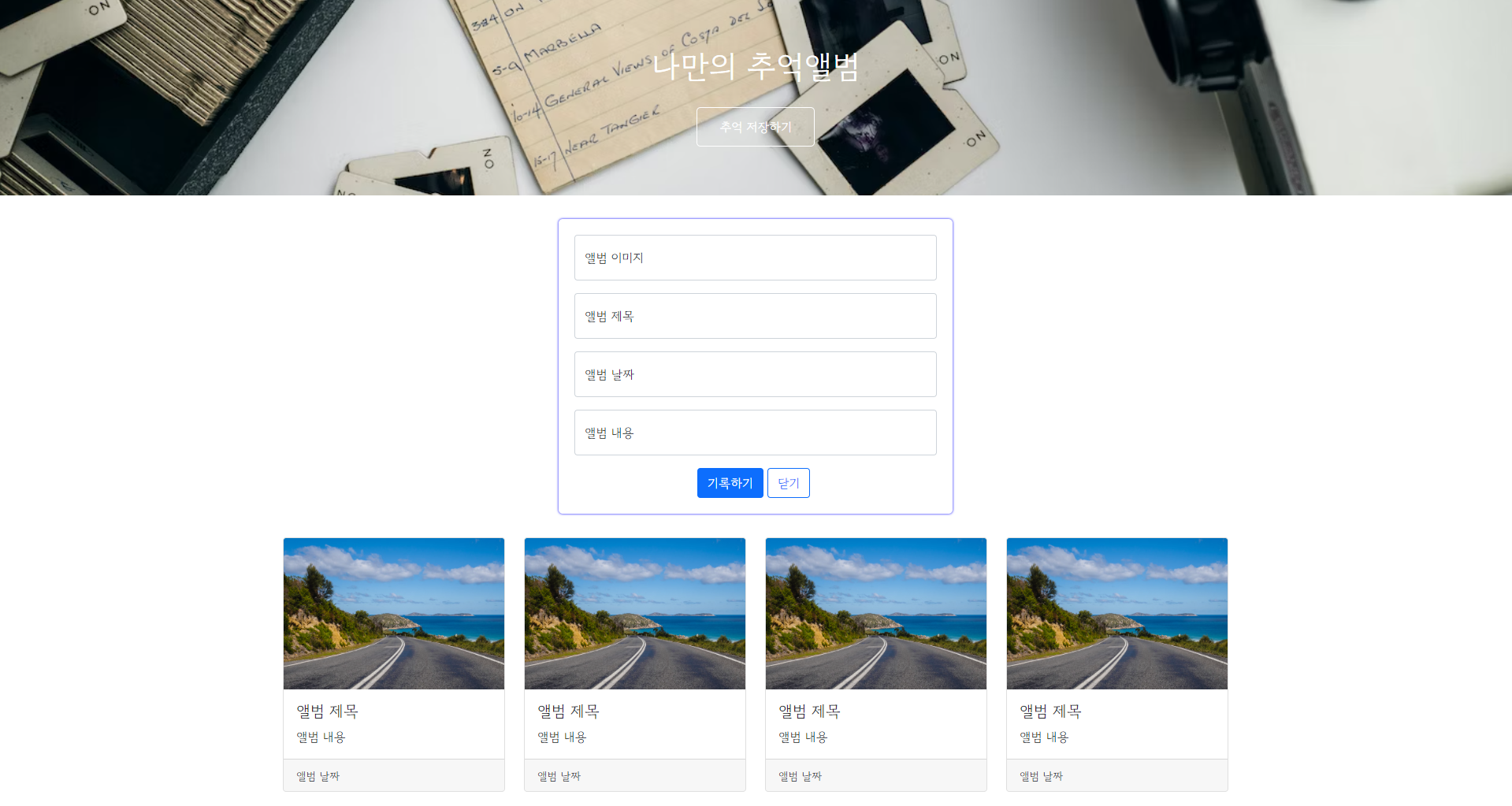
나만의 추억앨범의 상단부와 플로팅 박스, 카드들을 구현해보았다. 아직 기능은 전혀 없는 웹 페이지이고 앞으로 추억 저장하기 버튼을 클릭했을때 플로팅 박스가 toggle()함수를 통해 접혔다, 펴지는 기능과 직접적으로 앨범의 이미지 주소와 제목, 날짜, 내용을 입력하고 기록하기 버튼을 클릭했을때 카드가 추가되고 저장이 되는 기능을 배워 추가할 것이다.
01 부트스트랩, 구글 폰트 CDN 추가
1) 부트스트랩을 적용
<link href="https://cdn.jsdelivr.net/npm/bootstrap@5.0.2/dist/css/bootstrap.min.css" rel="stylesheet"
        integrity="sha384-EVSTQN3/azprG1Anm3QDgpJLIm9Nao0Yz1ztcQTwFspd3yD65VohhpuuCOmLASjC" crossorigin="anonymous">
2) 구글 폰트를 적용
@import url('https://fonts.googleapis.com/css2?family=Gowun+Batang&family=Gowun+Dodum&family=Nanum+Myeongjo&display=swap');
        * {
            font-family: 'Gowun Dodum', sans-serif;
        }
02 프로젝트 구현
1) 상단부 구현 - Title, Button
(1) HTML

<div class="mytitle">
        <h1>나만의 추억앨범</h1>
        <button>추억 저장하기</button>
    </div>
(2) CSS
나의 추억앨범이라는 타이틀 이름과 추억 저장하기 버튼을 적용시키고 배경 부분을 unsplash에서 사용할 수 있는 무료 사진을 적용시켰다.
.mytitle {
            height: 250px;
            color: white;

            display: flex;
            flex-direction: column;
            align-items: center;
            justify-content: center;

            background-image: url('https://images.unsplash.com/photo-1511992243105-2992b3fd0410?ixlib=rb-4.0.3&ixid=M3wxMjA3fDB8MHxwaG90by1wYWdlfHx8fGVufDB8fHx8fA%3D%3D&auto=format&fit=crop&w=1470&q=80');
            background-position: center;
            background-size: cover;
        }
.mytitle > button {
            width: 150px;
            height: 50px;
            background-color: transparent;
            color: white;
            border: 1px solid white;
            border-radius: 5px;

            margin-top: 20px;
        }
2) 중단부 구현 - Posting box
(1) HTML

<div class="mypostingbox">
        <div class="form-floating mb-3">
            <input type="email" class="form-control" id="floatingInput" placeholder="name@example.com">
            <label for="floatingInput">앨범 이미지</label>
        </div>
        <div class="form-floating mb-3">
            <input type="email" class="form-control" id="floatingInput" placeholder="name@example.com">
            <label for="floatingInput">앨범 제목</label>
        </div>
        <div class="form-floating mb-3">
            <input type="email" class="form-control" id="floatingInput" placeholder="name@example.com">
            <label for="floatingInput">앨범 날짜</label>
        </div>
        <div class="form-floating mb-3">
            <input type="email" class="form-control" id="floatingInput" placeholder="name@example.com">
            <label for="floatingInput">앨범 내용</label>
        </div>
        <div class="mybtn">
            <button type="button" class="btn btn-primary">기록하기</button>
            <button type="button" class="btn btn-outline-primary">닫기</button>
        </div>
    </div>
(2) CSS
.mypostingbox {
            width: 500px;
            margin: 30px auto 30px auto;
            padding: 20px;
            box-shadow: 0px 0px 3px 0px blue;
            border-radius: 5px;
        }
        .mybtn {
            display: flex;
            flex-direction: row;
            align-items: center;
            justify-content: center;
        }
        .mybtn > button {
            margin-right: 5px;
        }
3) 하단부 - Cards
(1) HTML

<div class="mycards">
        <div class="row row-cols-1 row-cols-md-4 g-4">
            <div class="col">
              <div class="card h-100">
                <img src="https://images.unsplash.com/photo-1446768500601-ac47e5ec3719?ixlib=rb-4.0.3&ixid=M3wxMjA3fDB8MHxwaG90by1wYWdlfHx8fGVufDB8fHx8fA%3D%3D&auto=format&fit=crop&w=1446&q=80" class="card-img-top" alt="...">
                <div class="card-body">
                  <h5 class="card-title">앨범 제목</h5>
                  <p class="card-text">앨범 내용</p>
                </div>
                <div class="card-footer">
                  <small class="text-body-secondary">앨범 날짜</small>
                </div>
              </div>
            </div>
            <div class="col">
                <div class="card h-100">
                  <img src="https://images.unsplash.com/photo-1446768500601-ac47e5ec3719?ixlib=rb-4.0.3&ixid=M3wxMjA3fDB8MHxwaG90by1wYWdlfHx8fGVufDB8fHx8fA%3D%3D&auto=format&fit=crop&w=1446&q=80" class="card-img-top" alt="...">
                  <div class="card-body">
                    <h5 class="card-title">앨범 제목</h5>
                    <p class="card-text">앨범 내용</p>
                  </div>
                  <div class="card-footer">
                    <small class="text-body-secondary">앨범 날짜</small>
                  </div>
                </div>
              </div>
              <div class="col">
                <div class="card h-100">
                  <img src="https://images.unsplash.com/photo-1446768500601-ac47e5ec3719?ixlib=rb-4.0.3&ixid=M3wxMjA3fDB8MHxwaG90by1wYWdlfHx8fGVufDB8fHx8fA%3D%3D&auto=format&fit=crop&w=1446&q=80" class="card-img-top" alt="...">
                  <div class="card-body">
                    <h5 class="card-title">앨범 제목</h5>
                    <p class="card-text">앨범 내용</p>
                  </div>
                  <div class="card-footer">
                    <small class="text-body-secondary">앨범 날짜</small>
                  </div>
                </div>
              </div>
              <div class="col">
                <div class="card h-100">
                  <img src="https://images.unsplash.com/photo-1446768500601-ac47e5ec3719?ixlib=rb-4.0.3&ixid=M3wxMjA3fDB8MHxwaG90by1wYWdlfHx8fGVufDB8fHx8fA%3D%3D&auto=format&fit=crop&w=1446&q=80" class="card-img-top" alt="...">
                  <div class="card-body">
                    <h5 class="card-title">앨범 제목</h5>
                    <p class="card-text">앨범 내용</p>
                  </div>
                  <div class="card-footer">
                    <small class="text-body-secondary">앨범 날짜</small>
                  </div>
                </div>
              </div>
          </div>
    </div>
(2) CSS
.mycards {
            width: 1200px;
            margin: 20px auto 20px auto;
        }
👾 전체 코드 👾
더보기
<!-- 추억의 앨범 카드와 플로팅 박스 구현 -->
<!DOCTYPE html>
<html lang="en">
<head>
    <meta charset="UTF-8">
    <meta name="viewport" content="width=device-width, initial-scale=1.0">
    <title>나만의 추억앨범</title>
    <link href="https://cdn.jsdelivr.net/npm/bootstrap@5.0.2/dist/css/bootstrap.min.css" rel="stylesheet"
        integrity="sha384-EVSTQN3/azprG1Anm3QDgpJLIm9Nao0Yz1ztcQTwFspd3yD65VohhpuuCOmLASjC" crossorigin="anonymous">
    <style>
        @import url('https://fonts.googleapis.com/css2?family=Gowun+Batang&family=Gowun+Dodum&family=Nanum+Myeongjo&display=swap');
        * {
            font-family: 'Gowun Dodum', sans-serif;
        }
        .mytitle {
            height: 250px;
            color: white;

            display: flex;
            flex-direction: column;
            align-items: center;
            justify-content: center;

            background-image: url('https://images.unsplash.com/photo-1511992243105-2992b3fd0410?ixlib=rb-4.0.3&ixid=M3wxMjA3fDB8MHxwaG90by1wYWdlfHx8fGVufDB8fHx8fA%3D%3D&auto=format&fit=crop&w=1470&q=80');
            background-position: center;
            background-size: cover;
        }
        .mytitle > button {
            width: 150px;
            height: 50px;
            background-color: transparent;
            color: white;
            border: 1px solid white;
            border-radius: 5px;

            margin-top: 20px;
        }
        .mycards {
            width: 1200px;
            margin: 20px auto 20px auto;
        }
        .mypostingbox {
            width: 500px;
            margin: 30px auto 30px auto;
            padding: 20px;
            box-shadow: 0px 0px 3px 0px blue;
            border-radius: 5px;
        }
        .mybtn {
            display: flex;
            flex-direction: row;
            align-items: center;
            justify-content: center;
        }
        .mybtn > button {
            margin-right: 5px;
        }
    </style>
</head>
<body>
    <div class="mytitle">
        <h1>나만의 추억앨범</h1>
        <button>추억 저장하기</button>
    </div>
    <div class="mypostingbox">
        <div class="form-floating mb-3">
            <input type="email" class="form-control" id="floatingInput" placeholder="name@example.com">
            <label for="floatingInput">앨범 이미지</label>
        </div>
        <div class="form-floating mb-3">
            <input type="email" class="form-control" id="floatingInput" placeholder="name@example.com">
            <label for="floatingInput">앨범 제목</label>
        </div>
        <div class="form-floating mb-3">
            <input type="email" class="form-control" id="floatingInput" placeholder="name@example.com">
            <label for="floatingInput">앨범 날짜</label>
        </div>
        <div class="form-floating mb-3">
            <input type="email" class="form-control" id="floatingInput" placeholder="name@example.com">
            <label for="floatingInput">앨범 내용</label>
        </div>
        <div class="mybtn">
            <button type="button" class="btn btn-primary">기록하기</button>
            <button type="button" class="btn btn-outline-primary">닫기</button>
        </div>
    </div>
    <div class="mycards">
        <div class="row row-cols-1 row-cols-md-4 g-4">
            <div class="col">
              <div class="card h-100">
                <img src="https://images.unsplash.com/photo-1446768500601-ac47e5ec3719?ixlib=rb-4.0.3&ixid=M3wxMjA3fDB8MHxwaG90by1wYWdlfHx8fGVufDB8fHx8fA%3D%3D&auto=format&fit=crop&w=1446&q=80" class="card-img-top" alt="...">
                <div class="card-body">
                  <h5 class="card-title">앨범 제목</h5>
                  <p class="card-text">앨범 내용</p>
                </div>
                <div class="card-footer">
                  <small class="text-body-secondary">앨범 날짜</small>
                </div>
              </div>
            </div>
            <div class="col">
                <div class="card h-100">
                  <img src="https://images.unsplash.com/photo-1446768500601-ac47e5ec3719?ixlib=rb-4.0.3&ixid=M3wxMjA3fDB8MHxwaG90by1wYWdlfHx8fGVufDB8fHx8fA%3D%3D&auto=format&fit=crop&w=1446&q=80" class="card-img-top" alt="...">
                  <div class="card-body">
                    <h5 class="card-title">앨범 제목</h5>
                    <p class="card-text">앨범 내용</p>
                  </div>
                  <div class="card-footer">
                    <small class="text-body-secondary">앨범 날짜</small>
                  </div>
                </div>
              </div>
              <div class="col">
                <div class="card h-100">
                  <img src="https://images.unsplash.com/photo-1446768500601-ac47e5ec3719?ixlib=rb-4.0.3&ixid=M3wxMjA3fDB8MHxwaG90by1wYWdlfHx8fGVufDB8fHx8fA%3D%3D&auto=format&fit=crop&w=1446&q=80" class="card-img-top" alt="...">
                  <div class="card-body">
                    <h5 class="card-title">앨범 제목</h5>
                    <p class="card-text">앨범 내용</p>
                  </div>
                  <div class="card-footer">
                    <small class="text-body-secondary">앨범 날짜</small>
                  </div>
                </div>
              </div>
              <div class="col">
                <div class="card h-100">
                  <img src="https://images.unsplash.com/photo-1446768500601-ac47e5ec3719?ixlib=rb-4.0.3&ixid=M3wxMjA3fDB8MHxwaG90by1wYWdlfHx8fGVufDB8fHx8fA%3D%3D&auto=format&fit=crop&w=1446&q=80" class="card-img-top" alt="...">
                  <div class="card-body">
                    <h5 class="card-title">앨범 제목</h5>
                    <p class="card-text">앨범 내용</p>
                  </div>
                  <div class="card-footer">
                    <small class="text-body-secondary">앨범 날짜</small>
                  </div>
                </div>
              </div>
          </div>
    </div>
</body>
</html>
반응형
'Study of Development > Front-End' 카테고리의 다른 글
| [FE] 영화 검색 사이트(바닐라JS) - (2) 중단부_검색창 (0) | 2024.01.08 |
|---|---|
| [FE] 영화 검색 사이트(바닐라JS) - (1) 상단부_타이틀 (0) | 2024.01.08 |
| [FE] 구글 폰트 적용하기 (0) | 2023.12.31 |
| [FE] 간단한 로그인 페이지 구현(HTML/CSS) (0) | 2023.12.31 |
| [FE] 부트스트랩 사용하기 (0) | 2023.12.31 |